Being clever at the beginning of each post is exhausting, so from now on I'll mostly launch right into my subject matter, which is generally "searching the internet."
I also want to be able to use posts to explain some items as opposed to trying to edit tweet threads.
Eventually you should look at files that you download, if your goal is to discover useful information. You want a form of index.
In my experience it is frequently necessary to download at least as many unwanted documents and files as those you can identify as of interest. This is a simple trade-off to avoid missing important items. It's just not that easy to target your Google search, click on documents based on the results page description, and read them sufficient to determine their use as you go, most of the results pages will be "false positives."
There are different approaches to examining your textual corpus; a simple method is creating a new folder for each search term, which is also the name the folder is given. You know where to look for certain subjects, and it's a method of "tagging" documents automatically, which can be useful later for data-mining and visualizing.
Interrogate every suspect byte with every enhanced method at your disposal. I mentioned I've used developer tools to extract information from software files, essentially by accident. You don't need to be using a software correctly if it does what you want it to do.
Keep in mind that behavior, like any 'object,' in a computer environment requires something be written. And you don't visit websites, websites visit you (or are represented by a cached surrogate stored by your DNS provider).
I will cheat a little here and use a directory and subfolders from an FTP, one I mentioned in another post.
I'm going to be using Freeplane at first, which is free to download (link in above tweet). I'll either update this post incrementally, or link to new posts, to keep from writing an overly long tutorial.

Freeplane can be used to build mindmaps from scratch or from imported files. It will also import file folder structure, which is what we'll do for the directory shown above.

Under the File tab go to Import > Folder Structure. This creates a map like so
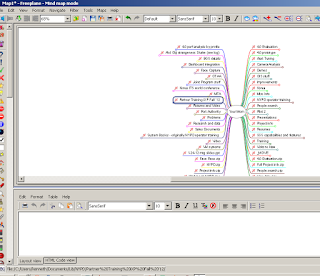 Only one level is "unfolded," that is, only the top directories are visible, and subdirectories can be revealed by clicking on their superior nodes.
I also want to be able to use posts to explain some items as opposed to trying to edit tweet threads.
Begin with a basic organizational tool like Freeplane, open source mind mapping software. Here's two views, same map https://t.co/lUPrVY0lkj pic.twitter.com/J0RopwuujE— Kenneth Lipp (@kennethlipp) January 16, 2017
Eventually you should look at files that you download, if your goal is to discover useful information. You want a form of index.
In my experience it is frequently necessary to download at least as many unwanted documents and files as those you can identify as of interest. This is a simple trade-off to avoid missing important items. It's just not that easy to target your Google search, click on documents based on the results page description, and read them sufficient to determine their use as you go, most of the results pages will be "false positives."
There are different approaches to examining your textual corpus; a simple method is creating a new folder for each search term, which is also the name the folder is given. You know where to look for certain subjects, and it's a method of "tagging" documents automatically, which can be useful later for data-mining and visualizing.
Interrogate every suspect byte with every enhanced method at your disposal. I mentioned I've used developer tools to extract information from software files, essentially by accident. You don't need to be using a software correctly if it does what you want it to do.
Keep in mind that behavior, like any 'object,' in a computer environment requires something be written. And you don't visit websites, websites visit you (or are represented by a cached surrogate stored by your DNS provider).
I will cheat a little here and use a directory and subfolders from an FTP, one I mentioned in another post.
I'm going to be using Freeplane at first, which is free to download (link in above tweet). I'll either update this post incrementally, or link to new posts, to keep from writing an overly long tutorial.

Freeplane can be used to build mindmaps from scratch or from imported files. It will also import file folder structure, which is what we'll do for the directory shown above.

Under the File tab go to Import > Folder Structure. This creates a map like so

Jumping straight into the subject sounds like a refreshing approach! Speaking of simplifying life, when it comes to managing online classes, sometimes the best solution is to pay someone to do my online class. It frees up time for things like exploring the internet and diving deep into fascinating topics without added stress.
ReplyDeleteJust like exploring the secrets of the internet, navigating my dissertation was a bit overwhelming at first. Luckily, I found Dissertation Help Services and their online dissertation help made all the difference! Their team was super friendly and knowledgeable, guiding me through every step. They really helped me refine my ideas and made the whole process much easier.
ReplyDeleteThis is a fascinating perspective on data organization and search efficiency. Similarly, when it comes to oral health, finding the best dentist in sharfabad ensures precise, expert care—no false positives—just reliable treatment tailored to your needs and long-term dental health.
ReplyDeleteExploring connections through mapping tools shows how ideas can grow from simple sketches into larger networks. I have used mind maps before, and seeing Documents Required for Indian e-Visa different views of one structure feels surprisingly useful for organizing thoughts.
ReplyDeleteDigital research becomes more effective through organized methods, careful exploration, and thoughtful information management. Practical approaches to indexing files, analyzing data sources, and using visualization tools can help researchers uncover valuable insights while Cameroon eVisa Processing Time provides guidance on application duration and travel preparation details. Navigating large amounts of online information requires structured techniques and efficient research practices.
ReplyDeleteI like the practical approach shared here. Organizing downloaded files into a structured system makes research much easier, especially when handling large amounts of information. The Freeplane example is simple yet effective, and the tips about indexing and analyzing data are genuinely useful. Madagascar e-Visa simplifies travel by allowing eligible visitors to apply online, submit documents electronically, receive approval quickly, and avoid lengthy embassy application procedures before departure.
ReplyDeleteOrganizing downloaded files by search terms can make large research tasks much easier to manage. The approach of combining folders, developer tools, and Morocco e-Visa Application Process, the series of steps involved in submitting an electronic visa request for eligible travel to Morocco, gives curious researchers practical ways to organize information and explore useful patterns. Visual mapping can further help uncover connections without relying only on standard search results.
ReplyDeleteI liked the idea of treating downloaded files as a searchable corpus rather than simply opening documents one by one. Organizing files by search terms and using folder structures as a form of tagging seems like a practical way to make large amounts of information easier to analyze. The Freeplane example also provides a useful visual approach to understanding complex directory structures. A Japan Tourist Visa allows eligible travelers to explore the country’s famous attractions, rich traditions, scenic landscapes, and vibrant cities. Before applying, visitors should review the latest eligibility criteria, required documents, application steps, and processing time. Providing accurate information and complete paperwork can help reduce delays. With thoughtful preparation and a well-planned itinerary, travelers can enjoy a memorable Japanese holiday filled with culture, adventure, and discovery.
ReplyDeleteOrganizing downloaded files by search terms creates a practical way to revisit findings later. Combining folders, developer tools, and Russia eVisa Requirements can make large collections easier to explore while reducing the chance of overlooking useful information during research.
ReplyDelete